From Backend Specialist to End-to-End Orchestrator: Building a Montessori App with Local AI
How I engineered an ad-free Montessori flashcard platform for my children using Svelte 5, local Intel Arc GPU inference, and multi-tier AI orchestration.

A curious reality unfolds when you hand a modern screen to a toddler: within minutes of playing what claims to be educational content on YouTube, the algorithm will quietly queue unskippable commercials. Even dedicated children’s applications on mobile app stores tend to fall into two traps: they either obsess over rote alphabet chanting while ignoring broader pedagogical vocabularies, or lock basic word cards behind perpetual monthly subscriptions.
As a father and lifelong backend specialist, I wanted something specific: a clean, zero-ad, distraction-free flashcard platform built strictly around the Montessori 3-part nomenclature (Concrete Object ↔ Word ↔ Pronunciation).
Commercially, buying an app or paying a subscription is unquestionably cheaper than sinking dozens of engineering hours into building one. But the true return on investment in systems engineering is rarely measured in subscription savings; it is measured in hands-on competence. By taking on this project end-to-end, I wanted to answer a practical question: how far can a backend specialist realistically go today when using modern AI to bridge unfamiliar frontend and mobile domains?
Here is the operational architecture, the hardware bottlenecks, and the lessons learned from engineering and battle-testing the platform in my living room.
1. System Topology: Decoupled Multi-Tier Pipeline
Rather than treating AI as a black-box chat interface, I treated it as a distributed production pipeline. The platform needed to generate pedagogical datasets, synthesize consistent visual assets, package deterministic audio, and deliver a fluid client across native mobile and big-screen TV displays.

2. The Limits of Local Models: Why Quantized LLMs Hallucinate Simple Realities
In homelab and self-hosting circles, running the entire AI lifecycle 100% locally and offline on bare-metal hardware is the holy grail. My daily driver workstation features a dedicated Intel Arc A770M with 16GB VRAM, paired with the Intel OpenVINO Model Server (OVMS).
Naturally, my initial design attempted to keep the entire generation pipeline local:
- Run a quantized local LLM (
Qwen 3.5 9B INT4) inside anovms-textcontainer to generate Montessori scene prompts. - Feed those prompts into an
ovms-imagecontainer serving a local diffusion model on the GPU.
Beyond the obvious hardware reality that attempting to co-locate active text inference alongside a 1024×1024 diffusion model on a single 16GB consumer card creates immediate VRAM contention and OpenCL allocation crashes, the deeper bottleneck was far more frustrating: subpar prompt quality from small local models.
When tasked with generating visual scene descriptions for preschool vocabulary, smaller quantized models repeatedly failed at basic physical commonsense and spatial relationships:
- Physical Implausibility: When asked to describe a child wearing a shirt, the model outputted prompts describing a toddler sitting trapped inside a t-shirt.
- Disembodied Anatomy: When asked to illustrate body parts (e.g. foot or ear), it struggled to comprehend bodily context, producing surreal prompts of isolated limbs floating in mid-air rather than a child touching or pointing to the corresponding anatomy.
- Instruction Drift: Quantized 9B models frequently ignored negative formatting constraints, leaking quotation marks, explanatory preamble, and stylistic keywords that threw the downstream image model into confusion.
Even when running containers sequentially via orchestration scripts (spinning up ovms-text to generate a batch, unloading it from VRAM, and then launching ovms-image), the generation latency, container swap overhead, and constant manual cleanup of garbage prompts defeated the entire premise of an automated pipeline.
The Architectural Pivot:
I stopped forcing an underpowered local LLM to do semantic heavy lifting. I decoupled the pipeline and offloaded pedagogical nomenclature and prompt curation to Gemini Flash. At fractions of a cent per batch, it possessed the nuanced common sense required for toddler-safe scenarios with near-zero failure rates.
This freed the local Intel Arc A770M to focus entirely on its true strength: continuous, unmetered image diffusion, running uninterrupted at roughly 11 seconds per image.
3. The 80% Discard Rate and the “Four-Finger” Reality
Diffusion models excel at landscapes and abstract art, but child anatomy remains a notorious weakness. In early batch runs, I had to discard nearly 80% of generated images. The failure modes were stark:
- Disembodied limbs floating in the background.
- Grotesque hand anatomy—predominantly hands depicting four fingers (one thumb and three elongated digits) instead of five.
- Inconsistent artistic styles: without strict prompt constraints, one card looked like a 3D Pixar render, the next like an oil painting, and the third like an ink sketch.
 Figure: A live test render produced directly on my Intel Arc A770M using OpenVINO Model Server (Prompt: “children storybook kid waving hand”, inference latency: 10.77s). Notice the waving hand has exactly four digits (one thumb and three fingers), alongside surreal background artifacts—the exact failure mode that forced an 80% discard rate on early batch runs.

To manage this, I had my AI pair-programmer build a local Visual Vetting Studio (a lightweight browser gallery). This allowed me to rapidly review batches of 32 cards, hit [F] to flag anatomical mutants for deletion, and trigger automated regeneration.
To solve the style divergence, I locked every generation behind a non-negotiable system prompt visual anchor:
flat 2D vector illustration, modern children's picture book art, bold smooth clean outlines,
isolated subject, centered composition, solid soft cream background, vibrant cheerful pastel colors,
storybook art style, minimalist, kid-friendly, clean cute anatomy, wordless visual art,
zero text, no words, no letters, no labels, no typography
This visual anchor brought order to the chaos, ensuring that when cards were shuffled, the deck felt like a cohesive, professionally illustrated storybook rather than an incoherent collage.
4. Frontend & Audio Engineering: Edge Realities
With the visual dataset stabilized across 498 Montessori curriculum words, building the client application surfaced classic edge constraints across mobile and television environments.
The Audio Pivot: Why WebSpeech Was Stripped
The browser’s native SpeechSynthesis API initially seemed like an elegant zero-dependency choice for word pronunciation. In production testing, however, it proved fragile:
- Budget Android phones and Android TVs frequently lack localized high-quality voice data packs due to limited onboard storage.
- Some television WebView implementations disable synthetic speech engines entirely or introduce unpredictable audio latency.
To ensure deterministic reliability, I stripped out the WebSpeech API completely. Instead, I pre-generated discrete, normalized MP3 audio files for every single vocabulary term. Bundling static MP3 assets guaranteed consistent pronunciation and 100% offline playback on any hardware without relying on the host OS speech subsystem.
Svelte 5 and the 3-Card Virtual Window
The frontend was engineered with Svelte 5 (leveraging modern Runes like $state and $derived), bundled with Vite 6, and styled with Tailwind CSS.
On modern smartphones, loading 498 high-resolution 1024×1024 illustrations is trivial. On an entry-level smart TV running an under-powered system-on-chip with 1GB of shared RAM, however, unconstrained DOM image retention causes quick memory leaks and browser crashes (OOM).
I implemented a rolling 3-image virtual window:
- The current card rendered on screen.
- The next card preloaded silently in memory for instantaneous zero-latency navigation.
- The previous card explicitly dereferenced and purged from DOM memory.
This bounded DOM memory usage to a flat O(1) ceiling, allowing hours of uninterrupted playback on budget TV hardware.
<!-- Svelte 5 Rune-based Navigation Engine -->
<script lang="ts">
  let currentIndex = $state(0);
  let deck = $props.deck;

  // Derive bounded 3-card rolling window to protect device memory
  let activeCard = $derived(deck[currentIndex]);
  let nextCard = $derived(deck[(currentIndex + 1) % deck.length]);

  function advance() {
    currentIndex = (currentIndex + 1) % deck.length;
  }
</script>

<svelte:window onkeydown={(e) => {
  if (e.key === 'ArrowRight' || e.key === 'Enter') advance();
}} />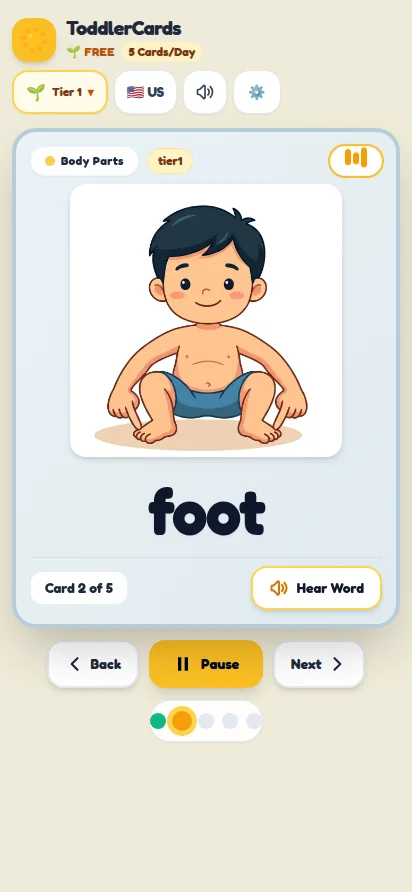
Figure: The responsive Montessori nomenclature client in mobile portrait orientation. The interface strictly isolates the visual subject, phonics audio prompt, and sight-word typography without commercial banners, navigation chrome, or algorithmically injected distractions.
5. Deployment and the Solo Publisher Barrier
The resulting application was packaged in two distinct formats:
- Docker Container: Served via an Nginx Alpine static container on my local homelab, loaded in a browser on a living-room PC connected via HDMI to the television with simple keyboard navigation (
ArrowLeft,ArrowRight,Enter,Space). - Native Android APK: Built via Capacitor 8, bundling all 498 compressed WebP illustrations and MP3 audio clips into a self-contained sub-15 MB standalone package that runs entirely offline, with full support for touchscreen interactions as well as Android TV remote controls (mapping the physical directional D-Pad directly to card navigation).
Once the English application was complete, the decoupled data layer made porting the pipeline to Chinese (Mandarin), Malay, Cantonese, Japanese, and Tamil straightforward, requiring localized nomenclature sets and audio assets rather than architectural rewrites.
Why It Isn’t on the Google Play Store
A natural question is: why not publish this to the Google Play Store for other parents?
In late 2023, Google introduced stringent requirements for personal developer accounts: individuals must recruit 20 opt-in testers who remain actively opted-in for at least 14 consecutive days before being permitted to apply for production access. Furthermore, Google mandates the public legal disclosure of personal home addresses on app store listings for individual developers.
For an engineering leader building software for his family, navigating that administrative friction makes little sense. To distribute professionally without exposing personal privacy, one must establish a formal corporate entity (such as an LLP). For now, sideloading the APK and streaming via homelab Docker fulfills the mission with zero corporate overhead.
6. Living Room Beta Testing: The Human Factor
Deploying software to production is straightforward; deploying software to your own children is humbling.
When I booted the app on the living room TV, the immediate victory was the total absence of commercial exploitation. There were no unskippable ads, no subscription banners, and no frantic visual clutter. The Montessori nomenclature did its job: clear image, clear spoken word, repeated calmly.
However, young children quickly provide a reality check on attention economics:
- While engaging, their focused attention span naturally peaks around 10 to 15 minutes.
- They did not care whether an illustration was generated by AI or drawn by a human artist; they cared whether the card was recognisable and intuitive.
- They didn’t notice the occasional four-fingered hand, but they immediately noticed if an image didn’t match their mental model of the object.
7. Strategic Takeaways for Engineering Leadership
Reflecting on this build yields three core perspectives for engineering directors and technical architects:
1. The Collapse of Siloed Engineering Roles
Historically, building this product would have required a multi-disciplinary team: a product manager for scoping, a UX designer for wireframes, a frontend engineer for Svelte, a mobile dev for Android packaging, and a QA engineer for regression testing.
With AI orchestration, a single engineer with solid systems fundamentals can credibly navigate the entire lifecycle—not by replacing specialist craft, but by unblocking execution across domains where they would previously have hit a wall. The primary differentiator for technical talent is no longer narrow domain syntax, but the ability to orchestrate autonomous tools, evaluate trade-offs, and enforce architectural constraints.
2. Quota Management vs Bare-Metal Infrastructure
Modern AI development requires understanding the financial and technical trade-offs between managed APIs and self-hosted open models:
- Frontier cloud APIs (Gemini Flash) provide unmatched semantic reasoning and near-zero hallucination rates for pennies.
- Local bare-metal inference (Intel Arc + OVMS) offers unmetered image generation and zero data leakage, but introduces hard physical constraints around VRAM limits and thermal ceilings.
- Knowing when to hybridize the two is the hallmark of practical systems architecture.
3. Real Competence Comes From Hands-On Scars
It is easy to form opinions on AI and modern web stacks from vendor benchmarks and marketing slides. But wrestling with OpenCL allocation faults on a local dGPU, managing DOM leaks on an underpowered TV, and vetting hundreds of deformed diffusion hands reinforces a simple truth: production realities always puncture paper architectures.
The highest return on investment in technology is the continuous willingness to build, break, and master real systems.